

As someone who’s more experienced in website building and platform development, I’ll admit that the social media side of things hasn’t always been my strongest suit. Thankfully, AI social media post generators have transformed content creation, making it much more manageable.
This guide goes into AI social media post generation, covering its benefits, key practices, and some top tools to help streamline your content process and captivate followers. Whether you’re a social media manager, small business owner, or marketer, this guide will arm you with the insights to utilize AI and elevate your social media strategy.
For further information, check out my post on best AI writing tools to discover how they can enhance your content strategy. If you need a spark of creativity, explore my guide on AI writing prompts for instant inspiration to generate fresh ideas for your posts. Additionally, don’t miss my beginner’s guide to AI writing assistants for tips on effectively using these tools in your content creation process.
The Advantages of AI Social Media Post Generators
AI has become an essential resource in social media content creation. Here’s a look at the key benefits of using AI-driven social media content generators:
1. Increased Efficiency and Time Savings
Using AI in your content creation process can save you valuable time. AI tools let you produce a large volume of quality posts quickly, freeing you up to focus on strategic planning and engaging with your audience.
2. Data-Driven, Personalized Content
AI can analyze vast datasets to fine-tune content to suit your audience’s interests, habits, and needs. This level of personalization boosts relevance, which in turn drives engagement and conversions
3. Higher Content Quality and Engagement
AI-generated content goes beyond basic text posts. With natural language processing and visual tools, AI creates polished, eye-catching, and relatable content, leading to stronger engagement and improved social metrics.
4. Scalability and Consistency
As your business grows, meeting social media demands can become overwhelming. AI allows you to scale content creation seamlessly, ensuring consistent, quality posts across all platforms.
AI Tools for Social Media Post Generation (ChatGPT and Jasper AI)
Several tools stand out in AI social media post generation. Here’s an overview of some of the best options:
1. Jasper
Jasper is a versatile AI writing assistant with templates designed specifically for social media posts, captions, and ad content. It helps generate creative, engaging text that aligns with brand tone and platform style.
For example below I used Jasper’s Instagram post template (also known as app) to create A motivational Instagram post encouraging followers to stay active and prioritize their well-being, with a call to action for community engagement. Jasper guided me through the full process and even created image for my post

2. ChatGPT
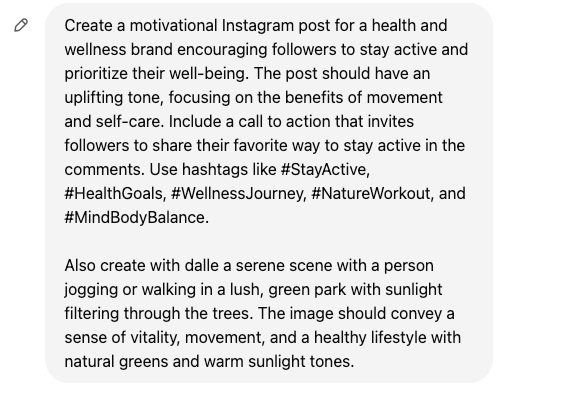
ChatGPT by OpenAI is ideal for brainstorming, generating engaging captions, and creating tailored responses. Its flexibility allows it to be used across platforms, from Instagram to LinkedIn. Here you can see I used same concept from above, but I had to guide ChatGPT.
Prompt given to ChatGPT or I could of had a conversation with ChatGPT so we can come up with the post:
Response from ChatGPT:
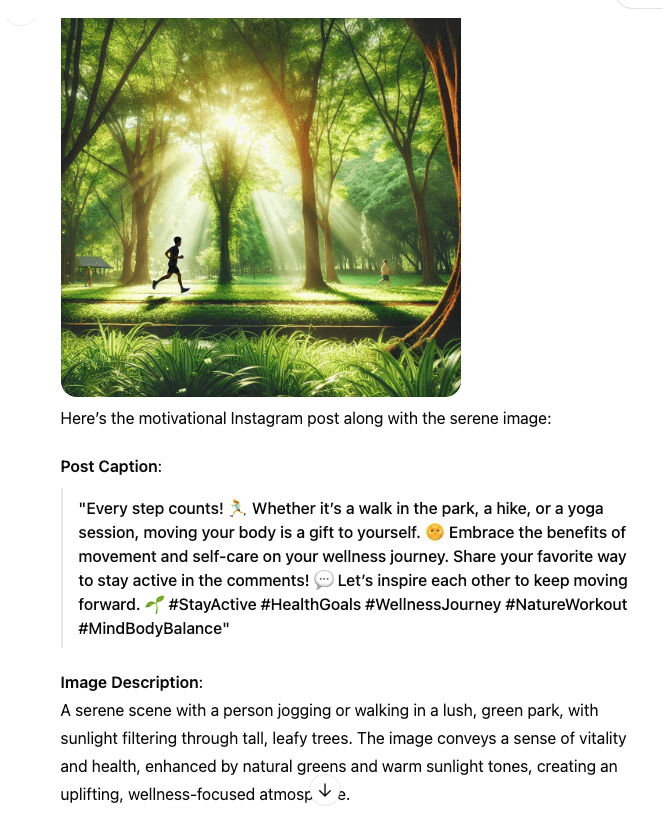
Overall View: Jasper provided a structured template designed with creators in mind, making it easy to organize the post, while ChatGPT handled my prompt well but in a more conversational and unstructured way.
How to Use Jasper as an AI Social Media Post Generator
Here’s a step-by-step guide for using Jasper to create social media posts:
SELECT A SOCIAL MEDIA TEMPLATE
Jasper provides several templates for social media, such as Instagram captions and LinkedIn updates. Start by selecting the template that matches your platform and content type.
- First select ‘Create Content’
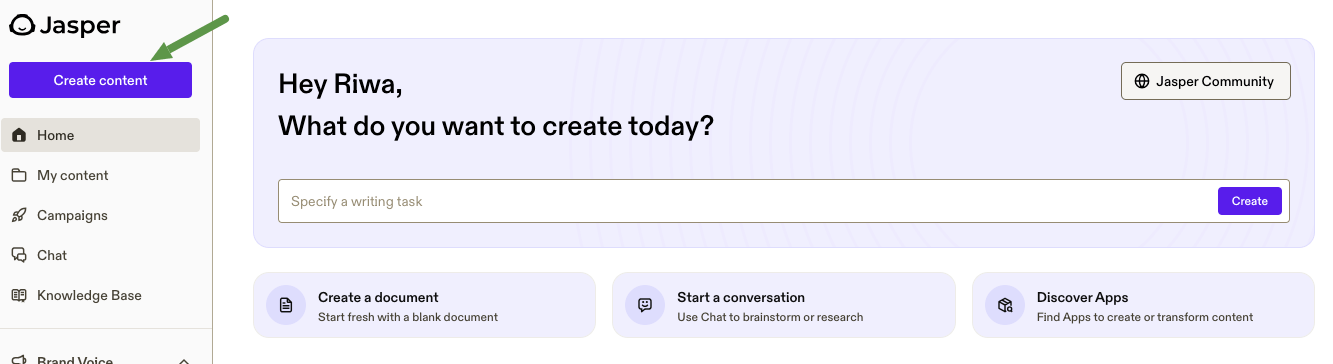
2. Choose ‘Category’> then ‘App’ or just specify the type of post you are looking for
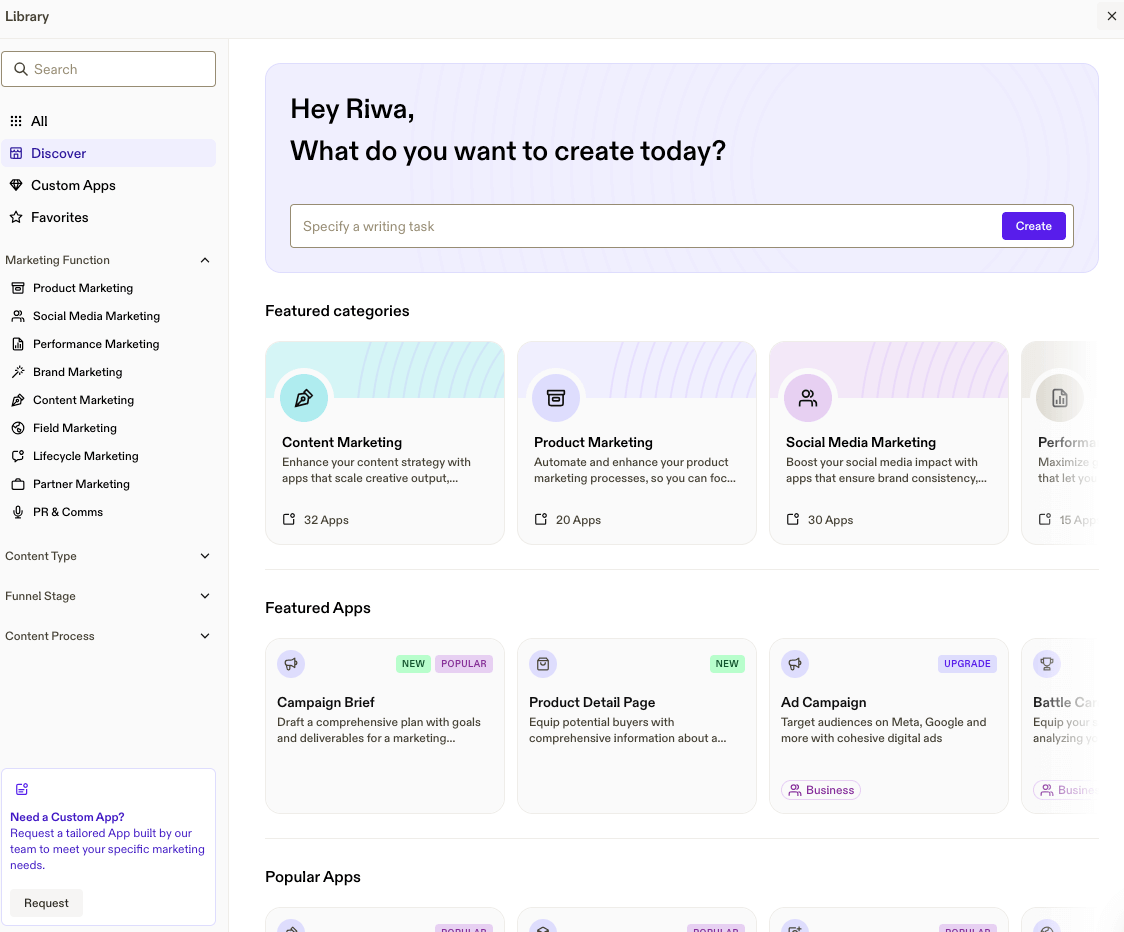
3. Enter Your Content Details
Input the topic, keywords, and tone for your post. You can specify a particular style, such as humorous or professional, to ensure the output matches your brand voice.
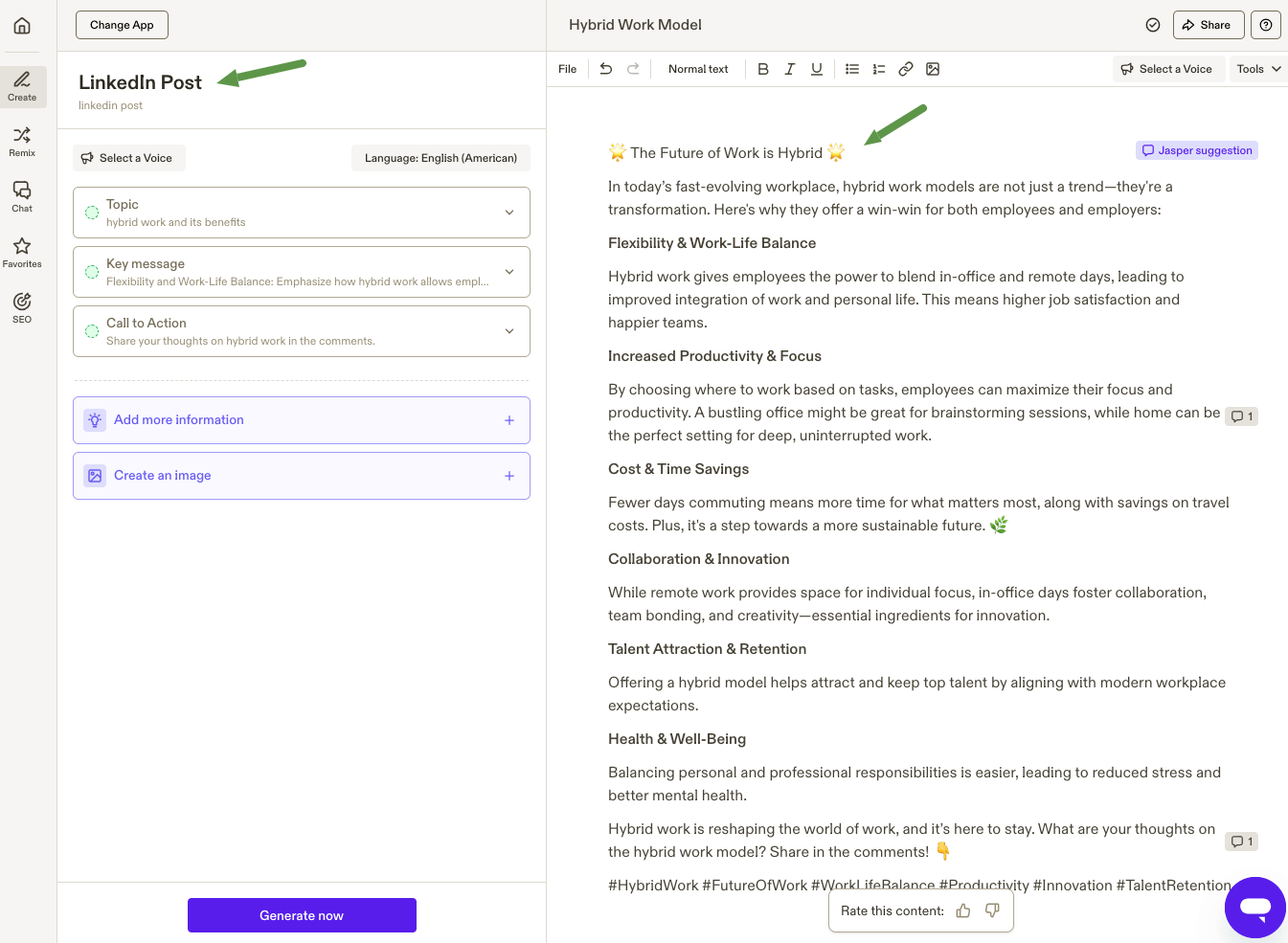
- Enter details like voice, topics, key message, call to action, in ‘Linkedin Post’ or whatever app you choose and Jasper will help you generate. This for example is a draft about hybrid work and its benefits which Jasper quickly generated as I followed its guide.
- Click “Generate now” to let Jasper create your post. Review the content and make adjustments if needed. Jasper’s “Content Improver” tool can further refine the text for readability and engagement.
4. Refine content
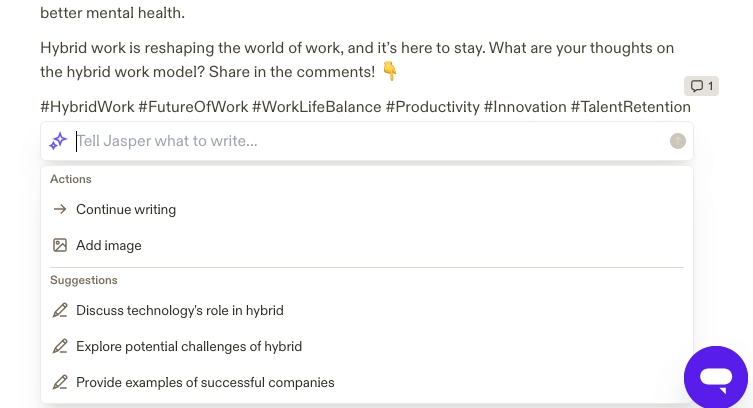
Jasper also allows you to refine content in a different conversational way, by giving you suggestions, etc.
See screenshot below showing suggestions if you click on + sign:
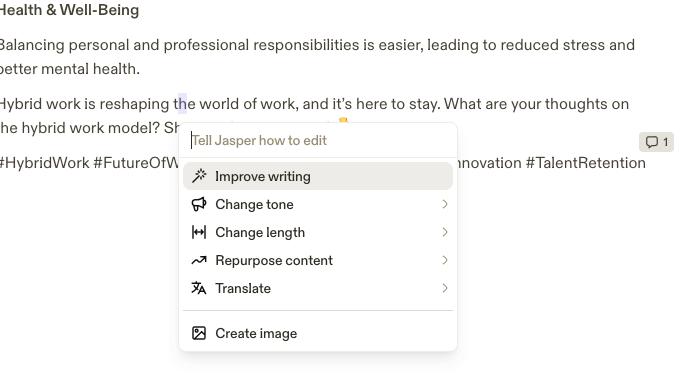
You can also click on “Ask Jasper” for more guidance:
Tips for Using Jasper Effectively
- Experiment with Tone: Adjust the tone to match the audience of each platform (e.g., casual for Instagram, formal for LinkedIn).
- Batch Create Content: Use Jasper to generate multiple posts at once, creating a stockpile for future scheduling.
How to Use ChatGPT as an AI Social Media Content Generator
Unlike Jasper, which provides specific templates and guided fields, ChatGPT works through open-ended prompts, allowing for a flexible but less structured approach. Here’s how you could use ChatGPT to generate similar content:
1. Craft an Effective Prompt
ChatGPT doesn’t have pre-defined templates, so start with a prompt that includes details you’d like in the LinkedIn post.
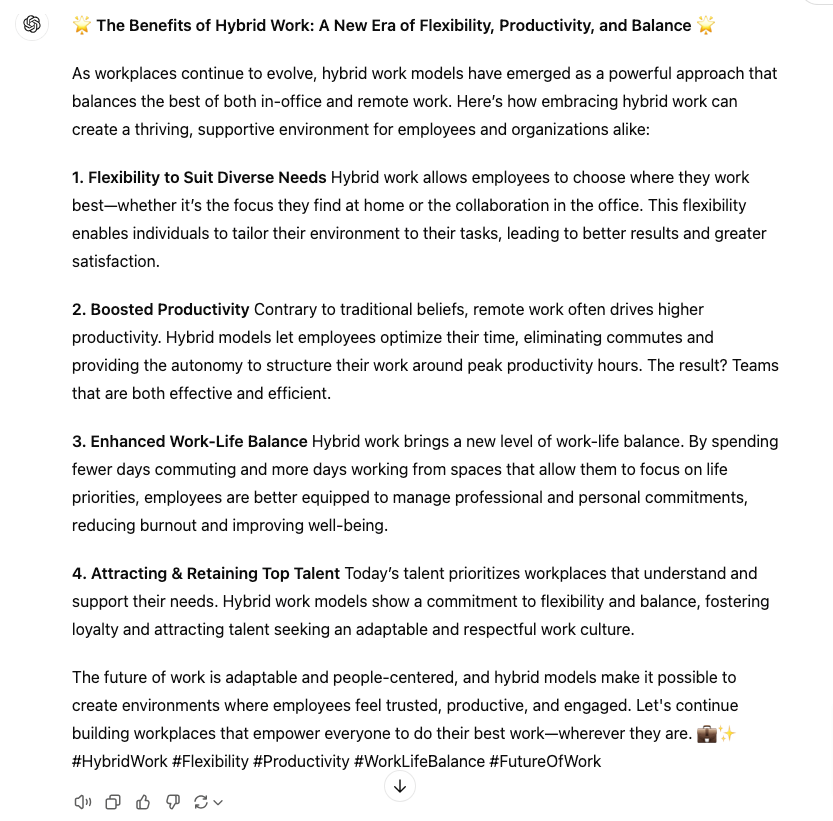
- Example Prompt: “Write a LinkedIn post on the benefits of hybrid work, focusing on flexibility, productivity, work-life balance, and talent retention. The tone should be professional and engaging, and the message should highlight how hybrid work models create a supportive, balanced work environment.”
Below is the output from ChatGPT:
2. Generate and Review Content
ChatGPT will produce a draft post based on the prompt. Read through the generated content and make adjustments as needed. You can also ask ChatGPT to refine or expand on specific points by following up with additional prompts.
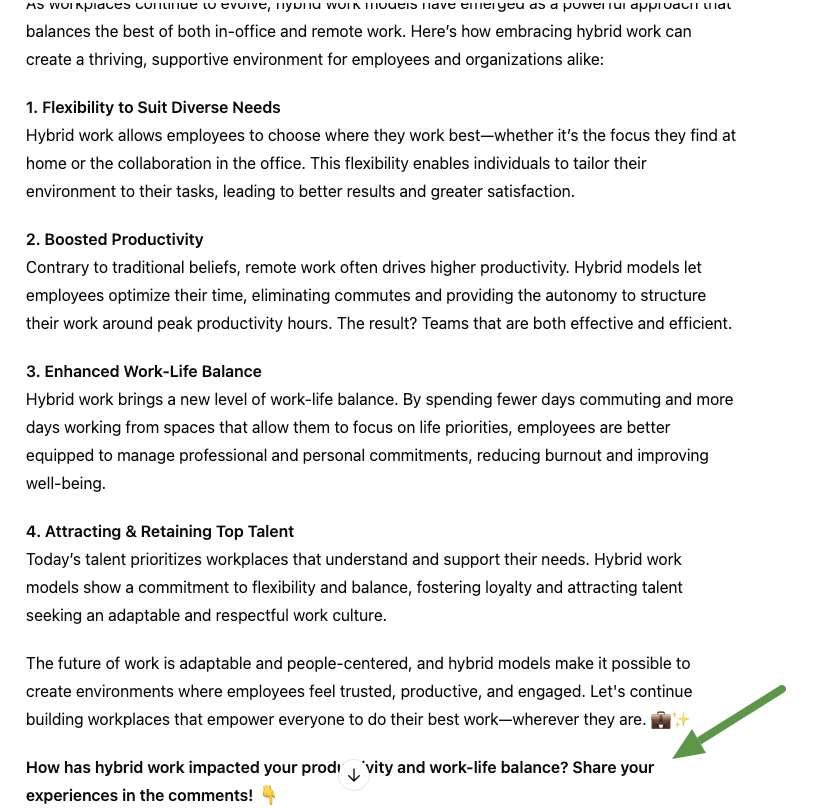
- Example Follow-Up Prompts: “Can you add a call to action asking readers to share their experiences with hybrid work?”“Make the tone a bit more conversational. Below you will see how it rewrote and added the CTA:
3. Refining the Post for LinkedIn
AAfter generating your post, use ChatGPT to refine it for LinkedIn’s professional tone and optimize it for better engagement.
- Adjust Tone: Ensure it’s professional yet conversational.
- Strong Opening: Start with a hook, like a question or fact.
- Add Insights: Include personal opinions or experiences.
- Include a CTA: Encourage comments or engagement.
- Use Hashtags: Use 3-5 relevant hashtags.
- Format & Proofread: Check for readability and errors
Tips for Using ChatGPT Effectively
- Be Specific in Your Prompts: The more details you include (e.g., tone, audience, key messages), the closer the output will be to what you need.
- Iterate with Follow-Up Prompts: You can ask ChatGPT to adjust, expand, or rephrase content without starting from scratch.
- Experiment with Tone and Length: ChatGPT can adapt to various styles and lengths, so feel free to explore different tones to match your audience.
Overall View
Using prompts in ChatGPT offers flexibility and creative control, ideal for unique, in-depth posts. Jasper templates, however, provide structure, speed, and precision, making them perfect for quick, high-impact content.
Best Practices for Effective AI-Generated Social Media Posts
- Understand Your Target Audience: A deep understanding of your audience is essential. Tailor content based on their interests, pain points, and platform preferences.
- Utilize Keywords and Hashtags: Include relevant keywords and hashtags to improve discoverability. This is especially helpful for increasing reach on platforms like Instagram and Twitter.
- Incorporate Visual Elements: Visuals are critical in social media. Pair AI-generated captions with compelling visuals. Tools like Canva can also help create engaging graphics that align with your post. If you have a subscription of ChatGP you can also create images and with Jasper you will need a paid subscription after the trial version to access these functionalities.
- Maintain Brand Consistency: Ensure AI-generated posts reflect your brand’s tone, style, and voice for cohesive branding across channels.
- Monitor and Analyze Performance: Regularly track engagement metrics like likes, comments, and shares. Use these insights to refine your AI-driven strategies and optimize content for higher performance.
Conclusion: Why AI-Powered Social Media Post Generators are Essential for Content Creation
AI social media post generators like Jasper and ChatGPT offer an efficient way to enhance and streamline your social media strategy. With benefits like increased productivity, tailored content, and scalability, these tools empower marketers to maintain a consistent, high-quality presence across platforms.
Whether you’re just starting with AI social media content generators or looking to optimize an existing approach, tools like Jasper and ChatGPT can help you engage your audience, save valuable time, and strengthen your brand’s online presence. Start using AI-powered content generation today and watch it positively transform your social media success.
For business owners and website managers who aren’t social media experts, these tools offer the guidance you need to navigate and grow confidently in the online space.
