

We all have stared at the screen with that daunting question of what to do next. Sometimes it might be a proposal you have to write or minutes of meeting to organize. This is where AI writing tools like Notion AI and ChatGPT come into play. Both are really helpful, but they each serve different purposes, so I use both since one handles tasks differently depending on the prompts I provide and what I’m trying to achieve. To explore other AI writing assistants, you can check more out here to find the perfect tool for your needs. For now let’s look at Notion AI vs. ChatGPT-both are very powerful tools.
Table of Contents
ToggleIntroduction: Notion AI vs. ChatGPT
Let’s take a closer look at what these tools are and how they can help you.
Notion AI
Notion AI helps you organize everything from tasks and projects to personal notes in the Notion AI app. The real magic of Notion is how customizable it is, especially with its template marketplace. The nice thing about Notion AI is you don’t have to start from scratch.
You can find pre-made templates for project management, content planning, and more. This speeds things up and makes it easy to get going.
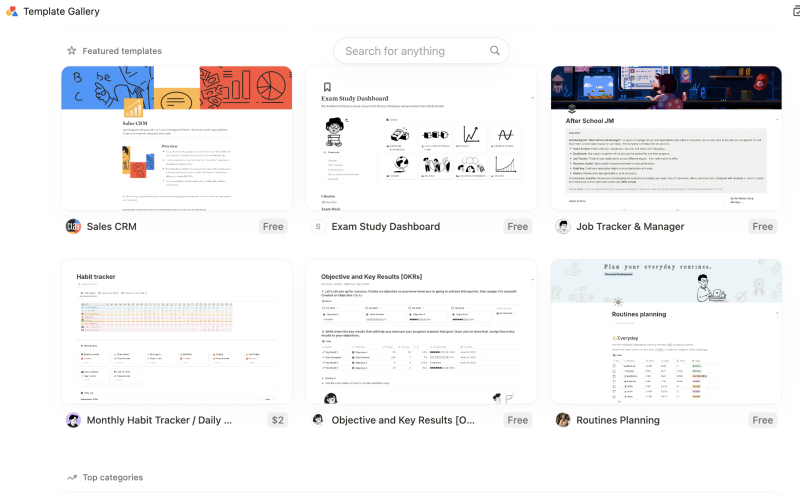
Screenshot : Notion Ai’s Template Gallery
Key Features of Notion AI:
- All-in-One Organizer: Manage tasks, notes, and projects in one place.
- Pre-Made Templates: Quickly set up workspaces with ready-to-use templates.
- Customizable Databases: Organize with tags and categories.
- Real-Time Collaboration: Work with others on the same document at the same time.
- Flexible Pages: Customize pages with tables, calendars, and to-do lists.
- Seamless App Integration: Connect with tools like Google Calendar and Slack.
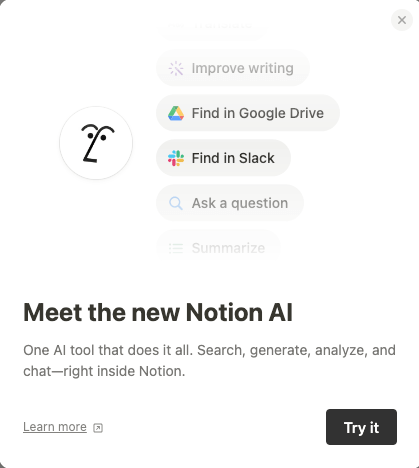
Screenshot from Notion AI
- Fast Search: Easily find what you need in your workspace.
- Nested Pages: Organize content with pages inside pages for better structure.
- Multimedia Support: Add images, videos, and links to your documents.
- Cross-Platform Access: Use on desktop, web, or mobile.
ChatGPT
ChatGPT, developed by OpenAI, is a flexible tool that assists with tasks like writing, idea generation, and problem-solving. It can also work with certain apps like Whimsical, allowing you to start creating mind maps, flowcharts, or wireframes directly within the ChatGPT interface. This integration helps you quickly generate visual ideas or structures while staying in ChatGPT.
However, if you need to make more detailed edits or collaborate further, ChatGPT will redirect you to the Whimsical app. There, you can fine-tune your work or continue building on what was started within ChatGPT. This approach allows for a smooth transition between generating ideas in ChatGPT and refining them in Whimsical, combining the strengths of both platforms for a seamless workflow. For example here, I wrote a piece about the history of ramen for another site using whimsical using Explore GPTs, then after it created it in chatgpt, it asked if I want to edit in whimsical:
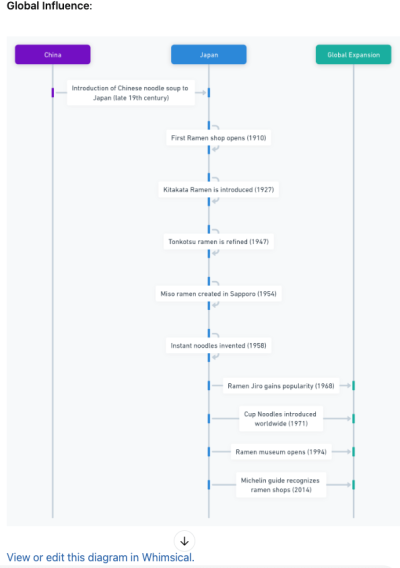
Key Features of ChatGPT:
- Multi-Tasking: Helps with tasks like writing blog posts and answering questions.
- Writing Variety: Adapts to different tones—formal, casual, or creative.
- Works Anywhere: Can be used in any setting without needing app integration.
- Idea Generator: Great for brainstorming and generating new ideas.
- Versatile: Handles creative writing, technical troubleshooting, and more.
- Free and Paid Options: Free version covers most needs.
- Accessible Everywhere: Use it on your phone, laptop, or desktop.
- Explore GPTs: Allows you try different apps on its platform if you have ChatGPT Plus. For example, I tried their AI Humanizer below. I provided AI-generated content from ChatGPT, and it asked me what specific content I wanted to humanize. It also prompted me to connect with their other app, and then it humanized the content for me.
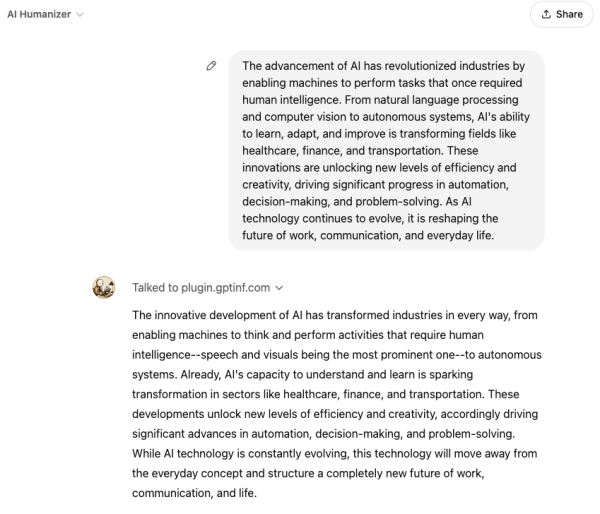
What really makes ChatGPT stand out is its flexibility. You can use it in any environment, and it slides right into whatever workflow you already have, with no need for extra apps or tools. Just open it up, and you’re good to go.
Content Creation: How Do They Compare?
Both tools help you create content, but in different ways.
Notion AI: Structured and Organized
If you need help organizing your content, Notion AI is your best friend. It’s ideal for:
- Summarizing meeting notes or articles
- Creating detailed outlines for projects or blog posts. For example, I gave Notion AI a blog I wrote about ramen and asked it to write an outline based on my full blog and this is what it came up with. It was quite organized according to my blog which was quite long:
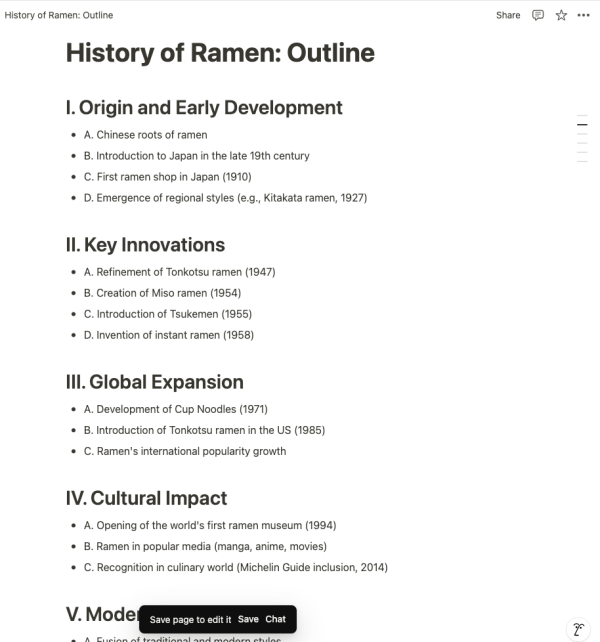
Screenshot: Outline on My Blog Generated by Notion AI
- Organizing information into structured, easy-to-understand formats
Notion AI fits perfectly into existing workflows, especially if you already use the Notion app. It’s a tool that makes the structured side of content creation way easier.
ChatGPT: Creative and Flexible
ChatGPT, on the other hand, excels in more open-ended, creative tasks like:
- Writing stories, scripts, or blog posts
- Brainstorming new content ideas
- Answering complex questions
- Role-playing scenarios, like acting as an expert or providing advice
ChatGPT is all about creativity. It can adapt to whatever you throw at it, and you can easily switch things up by giving it different prompts.
Ease of Use: Which is Simpler?
Notion AI: Built for Notion Users
If you’re already using Notion, adding Notion AI is simple. It’s integrated right into the platform, so you don’t need to worry about leaving the app or learning something new. It’s great for:
- People familiar with Notion who want an all-in-one solution for managing tasks and projects.
- Those who need structured content, like outlines or summaries.
ChatGPT: Easy for Anyone
ChatGPT is incredibly easy to use, even for beginners. It works just like a chat. You type in a question or prompt, and it responds. No special tricks or setup needed.
It’s great for:
- People who want quick answers or need help brainstorming ideas.
- Those who don’t want to worry about learning a new platform.
Customization and Flexibility
Everyone has different needs when it comes to content creation. Let’s look at how customizable these tools are.
Notion AI: Structured Adaptability
Notion AI is excellent when you’re working within the Notion ecosystem. It’s especially useful for pulling information from your existing notes and databases to create consistent, well-organized content.
Why Notion AI Is Great for Customization:
- Consistency: Helps you maintain a consistent tone and style within your Notion documents.
- Data-Driven Writing: Can pull from your existing content and create summaries or outlines that match your workflow.
- Task-Focused Customization: Great for structuring content around tasks, projects, or meeting notes.
ChatGPT: Flexible and Adaptable
ChatGPT is highly customizable. It works through prompts, meaning you can ask it to write in a specific style, tone, or format. Whether you need formal, conversational, or playful content, you can tailor the output by giving clear instructions.
Why ChatGPT Is Great for Customization:
- Prompt-Based Customization: You can tell it to write in any tone or style you want—whether it’s professional, casual, or creative.
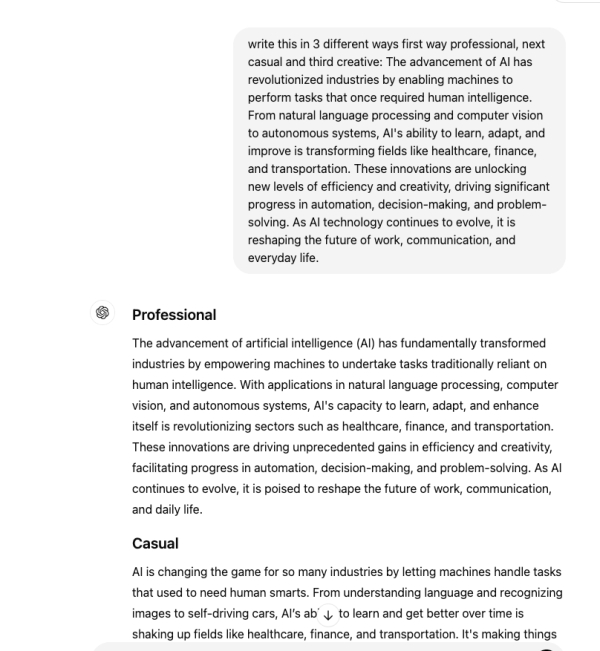
Screenshot: ChatGPT in Different Tones & Styles
- Multi-Tasking: It can handle a wide variety of tasks, from generating creative content to answering technical questions.
- Versatility: It’s not tied to one app or platform, so you can use it for anything, from blog posts to troubleshooting coding issues.
Collaboration: How Do They Handle Teamwork?
Content creation is often a team effort. How do these tools perform in a team environment?
Notion AI: Built for Collaboration
Since Notion AI is part of the Notion platform, it’s great for teams. Multiple people can work on the same document, and everyone can see and use the AI-generated content in real-time.
Key Collaboration Features of Notion AI:
- Real-Time Editing: Teams can work together on the same document, with changes and suggestions happening instantly.
- Seamless Collaboration: There’s no need to switch between apps; everything is done within Notion, making team projects smoother.
- AI Assistance for Everyone: Multiple users can benefit from the AI’s help without disrupting workflows.
ChatGPT: Best for Brainstorming, Limited for Collaboration
ChatGPT is great for individual work and brainstorming, but it doesn’t have built-in team collaboration features. However, teams can still share prompts and ideas with each other and use ChatGPT to generate content.
Key Collaboration Features of ChatGPT:
- Brainstorming: Ideal for brainstorming sessions where team members can bounce ideas off each other.
- Independent Use: Each team member can use ChatGPT individually to generate their own content, then bring it together.
Pricing and Accessibility
Notion AI is available as part of Notion’s paid plans, starting at $10 per user, per month. It includes all of Notion’s organizational tools, such as templates and collaboration features. There is also a free version with access to many useful tools.
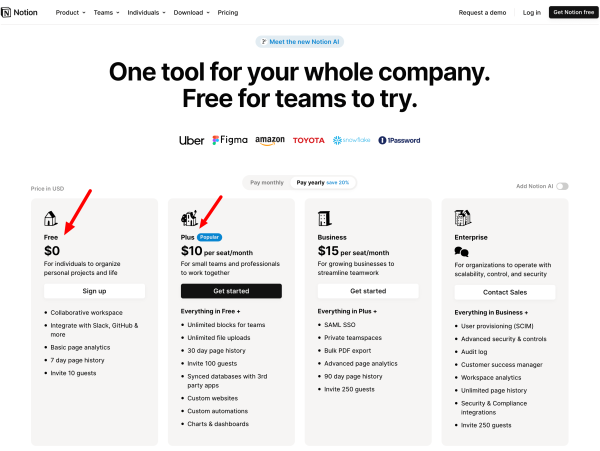
Screenshot: Notion AI Pricing
ChatGPT offers a free version that’s enough for most tasks. If you need more, ChatGPT Plus costs $20 per month and gives you access to faster responses and extra tools like DALL-E for generating images and other GPT in Explore GPTs.
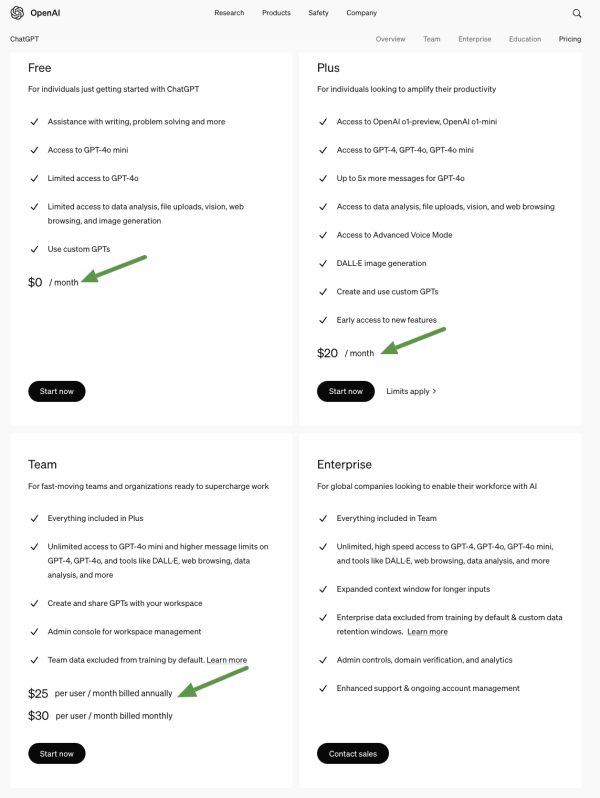
Screenshot: ChatGPT Pricing
Conclusion: Notion AI vs. ChatGPT
When comparing Notion AI vs. ChatGPT, each serves a distinct purpose. Choosing between them depends on whether you need a structured, team-oriented tool or a more creative, flexible content generator.
- Use Notion AI if you need structured content, task management, and a tool that works well with teams.
- Use ChatGPT if you need creative, flexible content generation and want something that fits easily into any workflow.
Both tools are great at what they do, and the choice depends on your specific needs.
